 ADSCivil
Download and install ADS Civil free of charge
ADSCivil is a dedicated software suite for survey, design and BIM delivery on technical infrastructure works. It runs on a CAD platform and helps engineers keep data consistent from existing-condition survey and detailed design through to drawing production, quantity take-off and BIM model export.
The ADSCivil suite comprises these main modules:
- ADSCivil Survey: processes survey data and builds terrain models and contours.
- ADSCivil Road: designs alignments, profiles and cross sections, and calculates cut and fill quantities.
- ADSCivil Intersection: designs intersections and alignment connection points.
- ADSCivil Level: designs earthworks and calculates levels and cut and fill quantities.
- ADSCivil Sewer: designs stormwater and wastewater drainage systems.
- ADS RoadMarking: designs road safety systems, signs and road markings.
- ADSCivil VPV: builds BIM models, federates models, checks for clashes and exports IFC 4.3
- ADSCivil IFC: develops 3D alignment options and produces quantity estimates for reporting
1. Runs on a range of platforms
ADSCivil runs on a number of widely used platforms including Civil 3D, AutoCAD, ZWCAD and other CAD platforms, from AutoCAD 2022 upwards. That leaves users free to pick the tools they already know and fit the software into them. Broad compatibility also makes it straightforward for ADSCivil to connect and share data with other software, which helps teams work together.
 |
 |
2. Before installing ADSCivil BIM 2026
Before installing, check the following:
- The computer runs 64-bit Windows 10 or Windows 11.
- A CAD platform compatible with ADSCivil BIM 2026 is already installed.
- There is enough free disk space to install the software.
- The internet connection is stable enough to download the installer and activate the licence.
- CAD software and other running applications are closed before installing.

3. Download the ADSCivil BIM 2026 installer
Download the ADSCivil BIM 2026 installer from the official link below:
ADSCivil BIM 2026 download link:
[SOFTWARE DOWNLOAD LINK]
Once you are on the page:
- Pick the ADSCivil BIM 2026 installer matching the CAD platform you use ( there are currently two editions, for AUTOCAD and for ZWCAD)
- Click Download.
- Wait for the download to finish.
- Check for the downloaded file in the Downloads folder on your computer
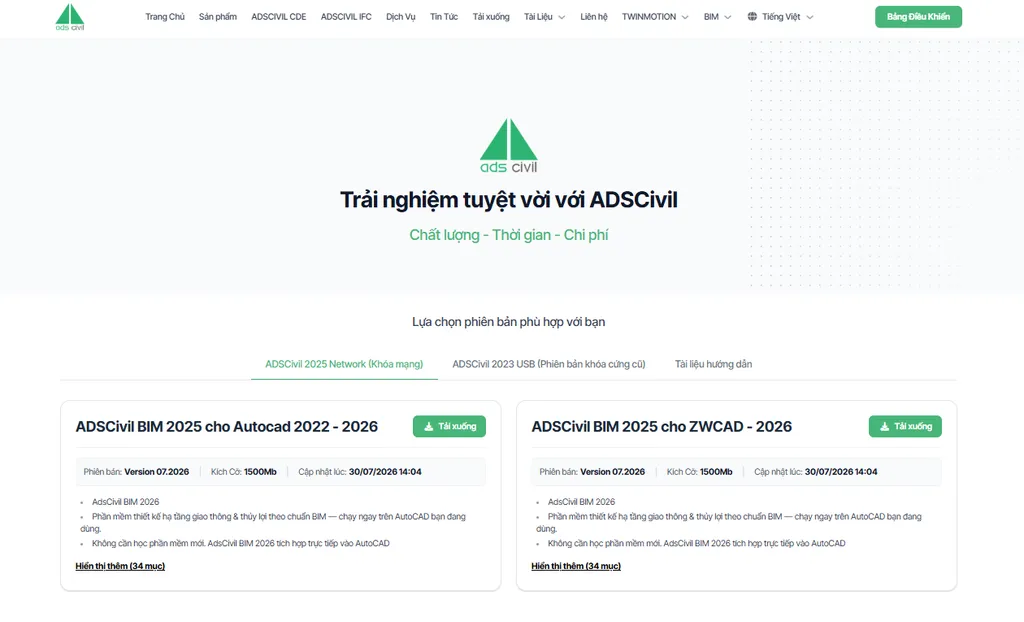
To stay safe and avoid problems later, only download ADSCivil from the website or the links ADSCivil provides officially.